
Offline mode is not designed to work as a backup connection method. It is an emergency continuation of processing only. Eftpos NZ is not responsible for any loss of stored transactions if your terminal malfunctions before those transactions upload to the Verifone Network.
If a transaction is not allowed in offline mode, your terminal declines it and shows one of the following messages: 'Declined', 'Invalid offline transaction', 'Over Offline Limit', 'Over System Limit' or 'Card Not Allowed'.
Offline mode allows you to continue taking payments when your terminal cannot connect to your payment network. Once the connection is restored, your terminal uploads the stored transactions for processing.
Triggering and exiting offline mode
Verifone network
Your terminal enters offline mode automatically if two consecutive financial transactions decline because of:
- a communications error, for example your internet is down
- the payment network being unavailable
- a failure to clear a pending transaction
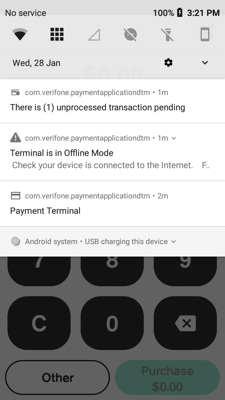
A Warning icon  will display in the notification bar. Your terminal confirms it is in offline mode and prompts you to perform a manual logon to exit. A successful logon takes the terminal out of offline mode.
Your terminal also attempts an automatic logon and tries to upload stored transactions every 10 minutes. If either succeeds, the terminal exits offline mode on its own.
Paymark network
Your terminal switches to offline mode if it receives two 'Comms Error' messages in a row, and only if it has completed a successful logon in the past 24 hours. When this happens, your terminal prompts you to process the transaction offline. Select Yes to continue.
Once your communications are restored, select LOGON from the main menu. If the terminal returns APPROVED, you are back online and any stored transactions will upload.
Limits and restrictions in Offline Mode
You can only accept card-present purchase transactions using debit, Visa, and Mastercard cards issued in New Zealand. You cannot process MOTO, cash out, refund, pre-auth, or contactless transactions while offline.
An offline transaction is only authorised if all of the following conditions are met:
- The cardholder is present at the time of the transaction.
- The receipt is signed by the customer and the signature matches the signature on the card, or the PIN is entered if prompted.
- Where a signature is required, the customer signs the first merchant receipt.
- You retain the signed receipt in a secure location for 12 months.
- You select to accept the signature on the terminal when prompted.
Transaction limits
- The maximum amount is $300 per transaction, per account, per card.
- Up to 200 transactions can be stored per offline session on the Verifone Network.
- Up to 99 transactions can be stored per offline session on the Paymark Network.
- Up to $5,000 in total transaction value can be stored per session on the Verifone Network.
- Some chip cards override the limits set in the terminal. These cards may allow only one offline transaction, or none at all.
Transaction types permitted
- Purchase
- Purchase with tip
- Purchase with surcharge
Not all card types are supported in offline mode. UnionPay, American Express, and third-party cards such as gift cards cannot be processed offline.