
Download the Quick Start Guide (PDF)
Watch set up video
What’s in the box?
-
Verifone Victa Portable EFTPOS terminal
-
Charging cable
-
Power adapter
-
Paper roll
Get to know your Victa Portable
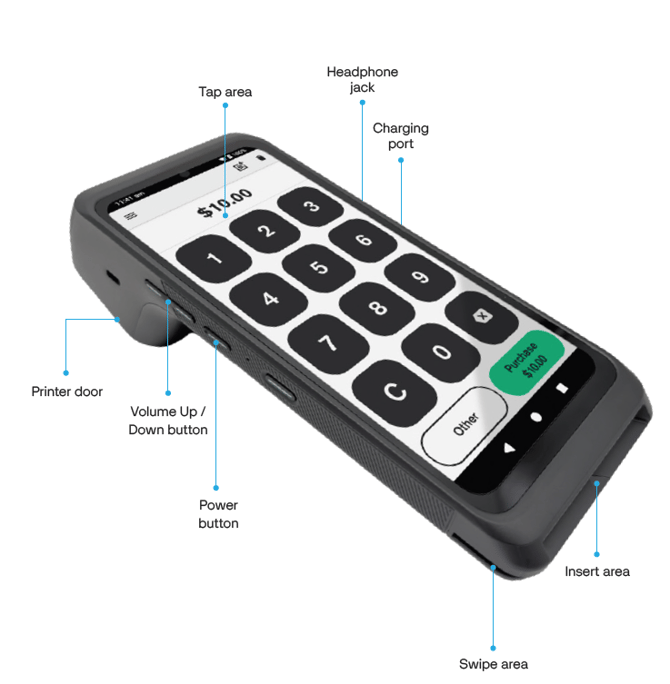
Get started in three easy steps
1. Power on your terminal
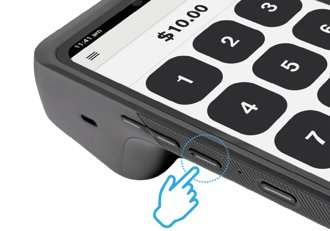
Your terminal comes charged and ready to use. Press and hold the Power button on the left side of the terminal until the screen lights up.
To restart or power off: Press and hold the Power button and then tap Power off or Restart.
2. Connect to the internet
If your subscription includes mobile data, your terminal will connect automatically. Otherwise, follow the steps below to connect to Wi-Fi:
-
Swipe down from the top of the screen and tap Internet
-
Select your Wi-Fi network
-
Enter your Wi-Fi password and tap Connect.
-
Press
 at the bottom of the terminal to return to the payment screen.
3. Set up your passcode
To set up or reset your passcode, call 0800 EFTPOS (0800 338 767). You must be the listed authority on your Eftpos NZ account.
Important: Setting up your passcode now helps avoid delays later when processing refunds.
Charging your terminal
Charge your Victa Portable using the included USB-C cable and power adapter.
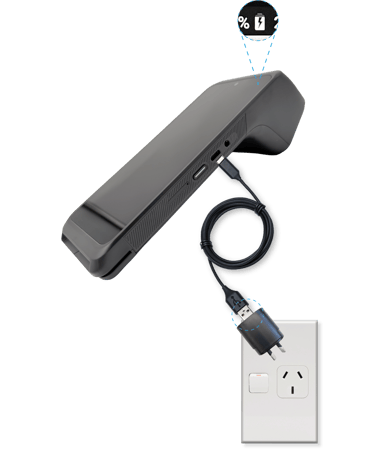
USB-C charging
-
Plug the USB cable into the wall adapter
-
Connect the USB-C end to the port on the side of the terminal
-
Your terminal will chime. Look for the charging icon 🔋 and light on the screen to confirm the terminal is charging
Replace the paper roll
-
Release the catch on the back of the device
-
Remove the empty roll
-
Place the new roll in the tray with the paper feeding from the top and pull the paper out through the door
-
Close the door until it clicks, leaving a small length of paper showing
Using low-quality paper can cause paper jams. Order high-quality paper rolls online at shop.eftpos.co.nz. Use code WELCOME at checkout and get free shipping on your first order.
More help to get started
Explore these guides to help you get the most out of your Victa Portable:
- Take your first payment
Learn how to process your first purchase transaction. - Find out when you get your funds
Settlement refers to the process of transferring funds from a customer's bank account to a merchant's account after a transaction has been completed. Learn how to check your settlement total and access settlement reports on your terminal. - Customise your receipt options
Find how to change what receipt options your terminal offers customers, how to stop printing receipts and how to reprint/resend receipts.
- Viewing transaction reports
Step-by-step instructions for accessing and understanding your daily and historical transaction reports.